Choosing the best digital art software starts with what you want to make: paint on an iPad with Procreate, paint on a computer for free with Krita, draw vectors with Inkscape, or follow Photoshop’s professional standard.
Say you have just unboxed a tablet, or you own a laptop and have no budget, and every ranking puts a different tool first. That happens because these programs solve different jobs. Match your output to a route below, then check the price and platform table before you commit. For wider lists, see best photoshop alternatives and Best Free Drawing Software 2026: Top Picks For Artists, Designers & Beginners – Picozu.
Quick routes by goal
Work out what ends up on the screen first, because the tool follows from the output and your hardware, not the other way round.
- Sketching and painting on a tablet: Procreate if you own an iPad, or Autodesk Sketchbook if you want a free app that follows you across devices.
- Painting on a computer without paying: Krita, which is free and open source.
- Logos, icons and clean line art: Inkscape for a free vector editor, or Affinity if you want a polished paid-or-free design suite.
- Comics and manga: Clip Studio Paint.
- Photo-based compositing and work that must match industry files: Photoshop, with free alternatives if the subscription is the obstacle.
- Deep brush libraries and a heavyweight painting workstation: Corel Painter.
Many artists end up combining a painting app with a vector or photo editor, so treat the routes as starting points rather than permanent commitments. The sections below explain the trade-offs behind each one.
Painting and sketching on a tablet
Tablet software suits artists who want to draw directly on the screen, and the choice is mostly settled by which tablet you already own.
Procreate on iPad
Procreate is described as a fast, deeply capable painting and illustration app with hundreds of brushes. It costs $12.99 as a one-time purchase on the App Store, with no subscription. The catch is platform lock-in: it runs on iPadOS only, with no Windows, Mac or Android version, so it lives and dies with Apple’s tablet.
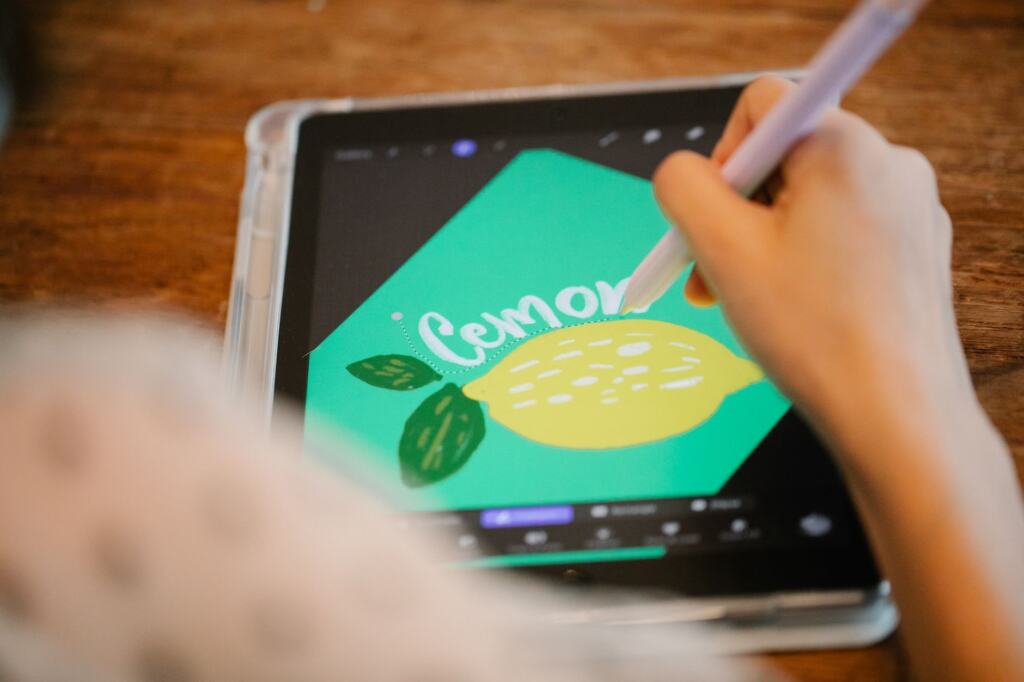
That makes Procreate the obvious pick if an iPad is already on your desk, because the software cost is small next to the hardware. If you do not own an iPad, the real price of choosing Procreate is the tablet, and a cross-platform app deserves a look first. Our guide to the best drawing app for ipad compares the options on Apple’s tablet in more depth.
Cross-device and Android options
Autodesk Sketchbook is listed as free on Windows, Mac, iOS and Android. That breadth is its main argument: it suits beginners who sketch on a phone or tablet and want the same app on a computer without paying anything. Clip Studio Paint also runs on iPad and Android, though it is priced differently there, as the table below shows.
Android artists have fewer polished painting apps than iPad owners do, and Krita’s Android release currently targets tablets only. Our roundup of the best drawing apps for android covers that ground in detail.
Painting on a desktop computer
Desktop painting software trades portability for screen space, keyboard shortcuts and, usually, deeper brush control. Two programs dominate this route at opposite ends of the price range.
Krita
Krita is free and open source and, according to a digital art software roundup, runs on Windows, Mac and Linux. It is a full painting program with over 100 brush engines and no watermark or ads. A paid version exists on some app stores purely to fund development, and the community also donates monthly to keep the software free.
The honest trade-off is polish. The same review notes that some professional artists have criticized Krita for lag and uneven brush softness. That does not make it a poor choice, but it does mean you should test your preferred brushes and canvas sizes on your own computer before building a workflow around it. For artists who need a free painting program that behaves like a serious tool, it is the strongest starting point in this guide.
Corel Painter
Corel Painter is the heavyweight option. It offers more than 900 brushes and AI-assisted tools, and it has been around since 1992. It is sold as a one-time purchase, with a subscription option, and it runs on Windows and Mac only, with no tablet-native app. It is also described as heavy, both to learn and to run, demanding a capable machine.
Painter suits artists who already know they want its brush depth and have a strong desktop to run it. For beginners and anyone on a modest laptop, it is the wrong place to start: try a free program first, and move to Painter only when you can name what you are missing.
Procreate versus Krita
Which is better, Procreate or Krita? It depends on your hardware, because the two rarely compete for the same device. Procreate is the pick for iPad owners who want a fast, polished painting app for a small one-time fee. Krita is the pick for anyone on Windows, Mac or Linux who wants to pay nothing. Both come with large brush sets, though Procreate’s hundreds of brushes and Krita’s over 100 brush engines are counted differently, so the numbers are not a like-for-like contest.
If you have an iPad and a computer, there is no reason not to use both. Prefer Procreate for sketching on the go, and Krita for longer sessions at a desk where a keyboard and a large monitor help.
Vector illustration, logos and layout
Vector tools describe artwork as shapes and paths rather than pixels, which is why they suit logos, icons and line art that must stay crisp at any size. If you are unsure whether your project needs pixels or paths, read Raster vs Vector Images: Choosing the Right Format for Design, Print, and Web (2026 Guide) – Picozu before you pick software.
Inkscape is a free and open source program for vector drawings that runs on Windows, Mac and Linux. It is the natural choice when you want vector work without a purchase, and it pairs well with Krita for artists who paint on one tool and prepare clean line art or logos on the other.
Affinity is the other name to know. A comparison lists Affinity by Canva as a free Photoshop alternative on Windows, Mac and iPad, while an aggregator listing for Affinity Designer shows a custom pricing plan. Because the two descriptions differ, confirm the current price and what the free tier includes on the vendor’s own page before you plan around Affinity Designer.
Canva appears here through the Affinity name, and its own easy design tools sit in a different category from painting software. If you need quick graphics rather than illustration, canva alternatives compares the simpler options.
Photo-based work and the Photoshop question
Photoshop remains the reference point for the whole category. A review of digital painting software says it still reigns supreme as an all-round industry standard for digital artists, including across the entertainment industry. It is also subscription-only, with the single-app plan starting from $22.99/mo on an annual plan billed monthly, according to a digital art software comparison, so you never stop paying.
Two details matter when deciding whether Photoshop is worth that. First, it is built photo-first, and painters sometimes prefer a dedicated painting app. Second, the cost is ongoing, which is easy to underestimate over several years. Our breakdown of adobe creative cloud cost sets out the plan options, and photoshop vs lightroom helps photographers who are choosing between Adobe’s two main editors.
Is there a free alternative to Photoshop?
Yes, and the right one depends on the job. For painting, Krita is the closest free match, and it supports PSD files so you can move between Photoshop and Krita with ease. For general design work, Affinity by Canva is listed as free on Windows, Mac and iPad. For photo editing, GIMP is the traditional free choice, although it is more focused on photo editing and can be used for drawing through its pen and lining options.
No single free program replaces every Photoshop function, so pick the one that matches your main task. If you are torn between the two best-known free painters, krita vs gimp compares them head to head.
Comics, manga and animation
Clip Studio Paint is named the best digital art software for comics and manga. On desktop it comes in two editions: Pro at $49.99 one-time, and EX at $219.99. For most newcomers, Pro is the sensible starting point, and the step up to EX is worth considering only once you know you need what the higher edition adds. Check Clip Studio’s own edition comparison before paying the difference.
Comic artists who work on a tablet should read the pricing note in the table below, because the iPad and Android versions are sold on a different model from the desktop editions. If your project is moving images rather than pages, the best 2d animation software guide covers programs built for frame-by-frame work.
Price, platform and license compared
This table puts the main tools side by side so you can rule out anything that does not run on your device or fit your budget. Photoshop is covered above because its subscription-only model does not fit a one-time-price comparison.
| Software | Price | Platforms | License | Planning use |
|---|---|---|---|---|
| Procreate | $12.99 one-time on the App Store | iPadOS only | Paid, no subscription | Best value if you already own an iPad; no use on other devices. |
| Krita | Free; paid store versions fund development | Windows, Mac, Linux; Android on tablets only | Open source | Default free painting program for desktop artists. |
| Inkscape | Free | Windows, Mac, Linux | Open source | Free route for logos, icons and line art. |
| Affinity by Canva | Free | Windows, Mac, iPad | Free listing | A free design and Photoshop-alternative option that includes an iPad version. |
| Autodesk Sketchbook | Free | Windows, Mac, iOS, Android | Free | Widest device coverage for casual sketching. |
| Clip Studio Paint | Desktop Pro $49.99 one-time, EX $219.99; iPad and Android subscription from about $0.99/mo or $26.99/yr | Desktop, iPad, Android | One-time on desktop; subscription on tablets | Choose for comics; pick the edition by the pages you plan to make. |
| Corel Painter | Around $429 one-time, subscription option | Windows, Mac | Commercial | A large brush library, but only for a strong desktop and a clear need. |
Prices and platforms come from a digital art software roundup, with Inkscape’s details and Krita’s Android note drawn from an art software resource list.
Pixel art, sculpting, effects and AI
Some goals need specialist tools, and each has its own comparison on Picozu rather than a short mention here. Retro game graphics are covered in best pixel art software, and 3D sculpting in zbrush vs blender.
If you want to try stylised effects on type and images once you have a main editor, Glitch Text Effect: Create Retro-Futuristic Distortion That Pops (2026 Guide) – Picozu walks through a distortion look. And if you are weighing image generators against hand-drawn tools, best ai art generator compares pricing and licensing, which matter if you plan to sell or publish the results.
Free versus paid: what you actually trade
The price on the box is only part of the cost, and the three payment models behave differently over time.
- Subscription: Photoshop is subscription-only, so the cost continues for as long as you use it. This suits artists who need current industry-standard files and can treat the fee as a working expense.
- One-time purchase: Procreate, Clip Studio Paint on desktop and Corel Painter charge once. This suits artists who want to know their total spend, though Painter’s price is far above the others.
- Free and community-funded: Krita and Inkscape cost nothing, and Krita’s development is supported by donations and optional paid store versions. The trade-off is occasional rough edges, such as the lag criticism that some professionals have raised about Krita.
A reasonable path for most beginners is to start free, learn what you actually use, and pay only when a specific limit is holding you back. For a deeper look at the free end of the market, Best Open Source Drawing Software: Top Free Tools, Features, And How To Choose In 2026 – Picozu covers the open-source options in detail.
System requirements and platform limits
Platform limits are more reliable than any spec sheet for ruling software out, so check the device before the feature list.
- Apple tablet only: Procreate runs on iPadOS and nothing else, so it cannot be a main tool for a Windows or Android artist.
- Desktop only: Corel Painter runs on Windows and Mac with no tablet-native app, and it demands a capable machine. Do not buy it for an older laptop without testing a free painting program on that machine first.
- Broad coverage: Krita covers Windows, Mac and Linux, and Autodesk Sketchbook adds iOS and Android. Affinity by Canva is listed on Windows, Mac and iPad, which makes it a rare option that spans a computer and an iPad.
Exact processor, memory and storage figures change with each release, so read the system requirements on the vendor’s download page for the version you are buying. The practical rule is simple: free software lets you test your hardware at no cost, so run it first and let that result guide any paid purchase.
What professional illustrators use
There is no single answer, and working professionals choose by deliverable. For general production, Photoshop is described as an industry standard across the entertainment industry. For comics and manga, Clip Studio Paint is the specialist pick. Corel Painter has a long history and a very large brush library, and Krita is used by artists who prefer open-source tools.
If you are aiming at paid work, the practical judgement is to match the file formats and tools your clients or studio expect. Krita’s PSD support makes it a low-risk way to practise before you decide whether to pay for Photoshop. Pick one primary program, learn it thoroughly, and add a second tool only when a specific job calls for it.
Frequently asked questions
| Question | Answer |
|---|---|
| Does Clip Studio Paint require a subscription? | Not on desktop, where Pro is a one-time purchase. On iPad and Android it is subscription-only, from about $0.99/mo or $26.99/yr. |
| Can Krita run on an Android phone? | The Android version is currently only available for tablets, so phone users should look at Autodesk Sketchbook instead. |
| Is GIMP a good drawing program? | GIMP is mainly a photo editor. It can be used for drawing through its pen and lining options, but Krita is the better fit for painting. |
| Why do Corel Painter prices differ between reviews? | One review lists around $429 one-time with a subscription option, while an older review put a new copy at $350. Confirm the current price on the vendor’s page before buying. |